
JailBee 1.7 is about scale. Once you run more than a handful of containers, with an agent busy in each, the questions change: which agent needs me, which containers can go, and how do I keep all of them current without visiting each one. This release answers those questions from the dashboard and from one command.
The three-minute tour:
A dashboard for many agents
The terminal dashboard now runs on Textual and takes the mouse. Click a row to select it, double- or right-click to open its menu, and scroll with the wheel. Over a slow SSH link the keys you type ahead still act in order. When the columns do not fit, the table scrolls sideways instead of hiding them.
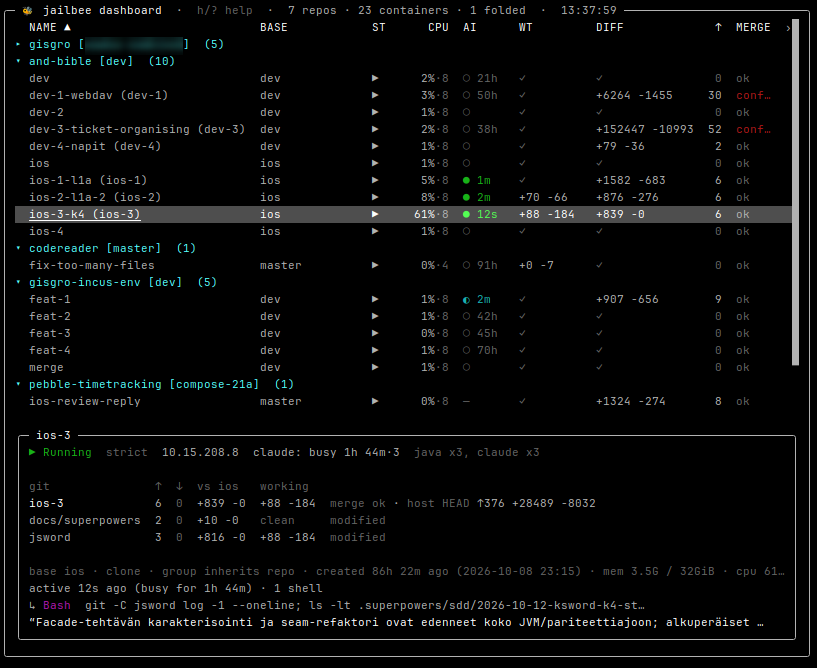
The point of the dashboard is that you rarely need to attach to a container to know where its agent is. Three parts of it do most of that work.
The AI column gives every container one mark: ● the agent is working,
◆ it is waiting for you, ○ it is idle, and, new in 1.7, ◐ it is idle
while a shell job it started keeps running. The time beside the mark is how
long ago the agent last did anything, and an agent that has just finished
stands out from the ones that have been idle for days. Scan the column and you
know which of a dozen sessions to look at first.
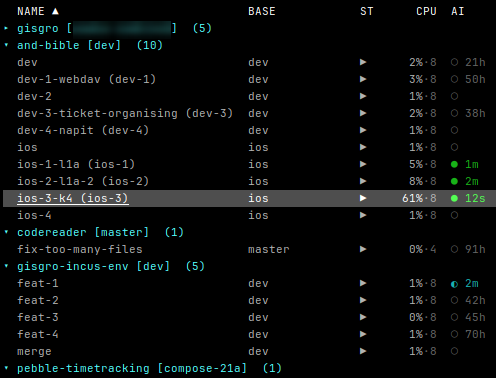
The details panel under the table is new, and it follows the selection
(v hides it, and brings it back). It describes the selected container in
one place: its state, network mode and address, and
the agent's state with its duration; a git table with the branch and each
submodule, how far each is ahead of the base, and what is uncommitted; then
how long ago the agent was active, how many subagents and shell commands it is
running, its last tool call and the start of its last message. When the
terminal has room, the recent events follow, newest first. The Qt dashboard
shows the agent's part in a tooltip.
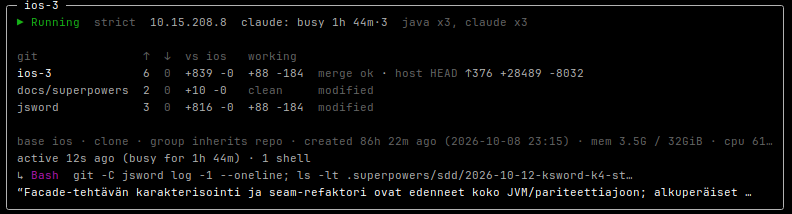
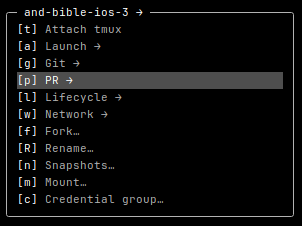
The menu opens on Enter, a double-click or a right-click, and holds what
you can do to the container right now: attach to its tmux, launch an IDE or a
browser in it, git and PR actions, restart, stop and destroy, the network, and 1.7's
fork and rename. Every entry has its own fixed key, so g u always updates
from the base and l D always destroys, however the menu happens to look
for that container.
All dashboards, TUI and Qt, now read from one shared background service, so a
second dashboard costs your host nothing extra. dashboard.refresh in
global.yaml sets how often it refreshes.
Many containers at once
A dozen agents also means a dozen containers to restart, update and clean up.
Space, Shift+↑/↓ or Ctrl+click now marks a container with ●, and the top
bar and the repo's header count the marks.
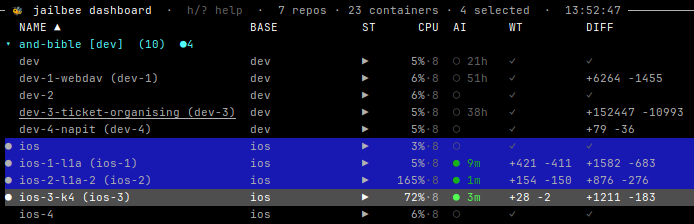
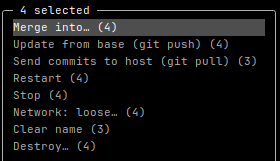
With anything marked, Enter opens one menu for all of them, and each entry says how many of the marked containers it applies to: all four can be restarted, but only three have commits to send to the host. Restart, stop, network changes, clearing a name and destroy run in parallel without leaving the dashboard, with one notice when the batch is done. Destroy asks once and lists what each container would lose. Git push and pull run once per repo, so their questions are asked once, and Merge into… takes the marked containers as sources and lets you pick the targets in the table: the way to collect several agents' attempts into one branch.
Also new for working across containers:
- Sorting.
<and>pick the sort column,Ireverses it, and a click on a header sorts by it. jailbee renamegives a container a name you can read, such aslogin-buginstead of the branch slug, without stopping it.jailbee forkstarts a second container from another one's committed state, so you can try two approaches side by side and merge the winner back withjailbee git merge.
Wildcards in the egress allowlist
Strict mode lists the hosts a container may reach by name. Some services answer on more names than you can list, so 1.7 accepts wildcards:
egress_allow:
  - "*.example.com"        # the domain and every subdomain, ports 80 and 443
  - "*.example.com:8443"   # one port
The kernel ACL cannot match on hostnames, so a wildcard goes through a Squid
proxy container that JailBee runs for you. It reaches tools that honour
HTTP_PROXY and HTTPS_PROXY, which covers package managers, curl, git
over HTTPS and most SDKs.
The proxy is a second layer, not a replacement. Every packet still meets the kernel ACL, which is the only way out of the container, so a tool that ignores the proxy is blocked rather than let through. In return, the proxy matches HTTP(S) requests by hostname, so a host that only shares a CDN address with an allowed one is now refused as well.
On the work network every container gets the proxy variables from its first
boot, so adding an entry with jailbee net egress add works in shells and
agents that are already running. jailbee net egress ls shows which entries go
through the proxy. See wildcards for
the details and limits.
Upgrading in one step
A JailBee upgrade sometimes needs jailbee base build or jailbee apply in
each repo. Until now, you ran those yourself, repo by repo. jailbee upgrade
does it for every registered repo. It runs only what the release notes say
each repo owes, and restarts no container, dockerd or LiteLLM instance:
uv tool upgrade jailbee
jailbee upgrade --dry-run   # what would run, and why
jailbee upgrade
1.7 owes apply in every repo, mostly for the egress proxy, so this is a good
release to try it on.
From another machine
The SSH service from 1.6 grew in three directions.
Native windows. From a Linux laptop running Wayland, waypipe ssh now
carries a container's GUI apps to your own desktop as ordinary windows,
instead of onto the shared RDP display:
waypipe ssh -t -p 8022 jailbee@your-host dashboard
Launch Chrome or the IDE from the dashboard's menu, and its window opens on your laptop. The windows close with the session; RDP is still there for Windows and for windows that should survive a disconnect. A browser that is already open on another display, at the host or on the RDP display, moves to the one you launch from instead of opening the window where you are not looking.
A better Mac story. Using JailBee from a Mac now starts from a Linux host with the Mac as its client: the dashboard and console over SSH, and GUI apps in Windows App on the shared display, clipboard included, or as native macOS windows through waypipe and the Cocoa-Way compositor. Running JailBee in a Linux VM on the Mac itself remains the experimental alternative.
Every command over SSH. Every command the remote console accepts now also
works as a one-shot ssh command, --repo can go anywhere on the line, and
repos lists what you can reach. The shell entry point is renamed
console; the old name keeps working until 2.0. One thing became
stricter: widening a container's network over SSH (net loose,
new --net loose, a container-scope net egress add) needs
remote.ssh.network: true, since loose mode can reach the host's LAN.
And there is more
1.7 also brings:
jailbee proffers to open or update PRs for changed submodules first, and links the PRs to each other;- optional mounts detach themselves after a while (
jailbee mount --for 2h), the way loose mode already reverts; jailbee new --storageputs one container on another storage pool;claude-jb -C 1mraises a LiteLLM session's context window, and the proxy is pinned to LiteLLM 1.106;- bare
jailbeeon a terminal opens the dashboard, and every command now runs without arguments and asks for what is missing; - the host's Wayland display reaches a container only when it opens its first window.
One default changed: loose mode now reverts after 15 minutes instead of 5. The full list, including fixes, is in the changelog.
Start with installation if you are new.